Lynara Review - A Modern Multi-Layer Tool for Designing Software Architecture
Welcome to this comprehensive Lynara Review!
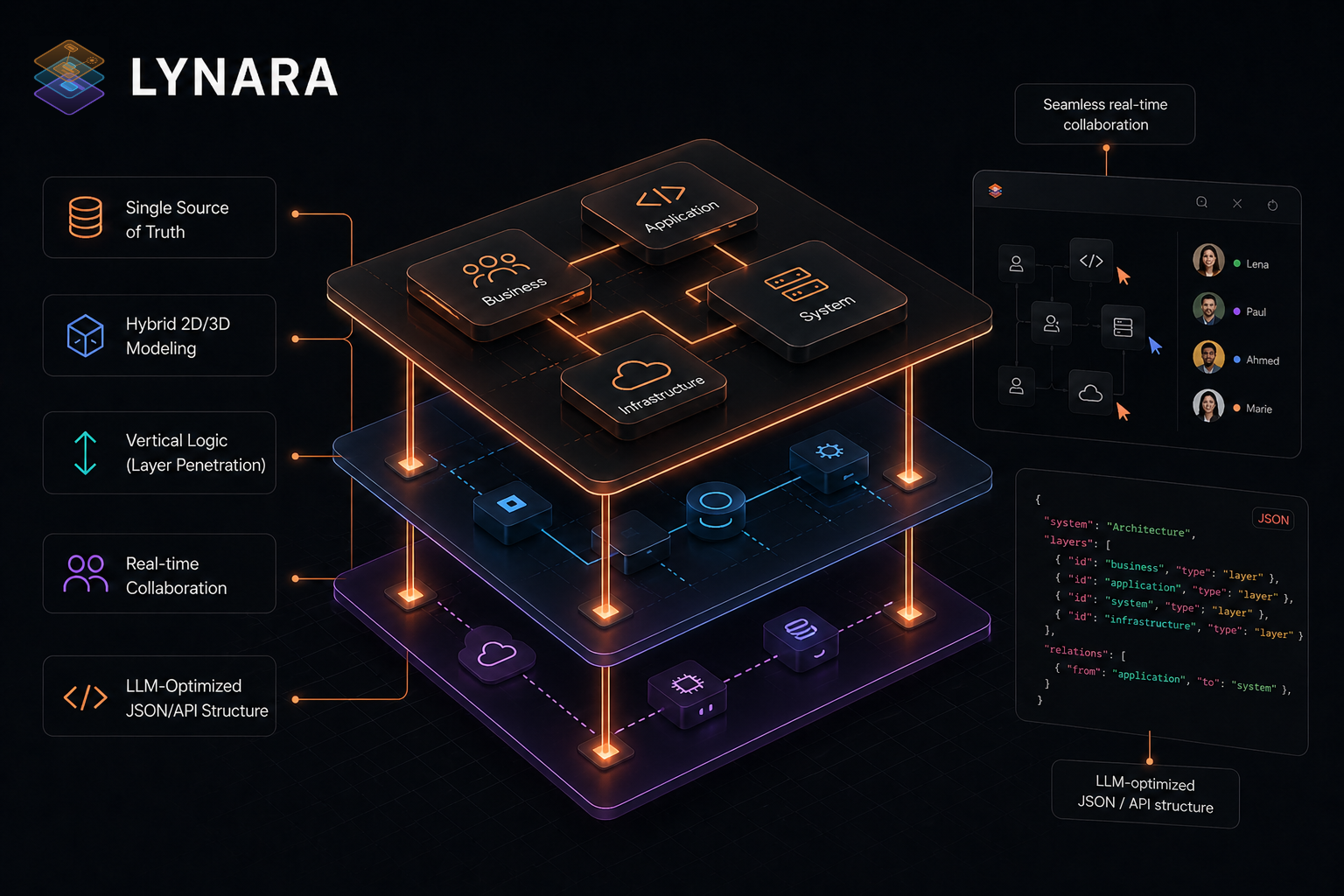
If you've ever worked on a complicated software project, you know the struggle: keeping track of everything from the frontend user interface down to the deepest infrastructure layer. Traditional diagram tools lock you into flat, two-dimensional representations that simply can't capture the true complexity of modern systems. Layers get tangled, relationships blur, and every time something changes you spend hours manually updating diagrams that are already stale.
That's the exact problem Lynara was built to solve. In this review, we'll look at how this modern software architecture visualization tool brings a fresh approach to system design through its distinctive multi-layer architecture design paradigm. Whether you're working with microservices, modular monoliths, or distributed hybrid server concepts, Lynara gives you the tools to create clear, organized, and future-proof architecture documentation.
What makes this review especially interesting is that Lynara comes from Switzerland—a country known for precision engineering and quality software. Let's see if this architecture diagram tool lives up to that reputation.
Why Modern Architecture Design Is Hard
Before diving into this Lynara review, let's understand why effective architecture design matters more than ever:
- Increasing system complexity: Modern applications span multiple services, databases, and infrastructure layers connected in sophisticated ways.
- Team collaboration needs: Distributed teams need a clear shared understanding of the system at every level.
- Documentation burden: Architecture docs quickly become outdated, causing knowledge gaps and onboarding friction.
- Communication gaps: Technical and non-technical stakeholders struggle to align without clear visualization.
- Scalability concerns: Poor early architecture choices create technical debt that's expensive to fix later.
This architecture review examines how Lynara meets these challenges with its unique multi-layer approach to system architecture design.
What Makes Lynara Stand Out
🎯 Built for Architects by Architects
Lynara was created because no existing tool could intuitively map the complexity of modern multi-layer architecture. As their concept page emphasizes: while others only allow drawings, Lynara provides a framework that understands the vertical logic of your system—from cloud infrastructure all the way to the user interface.
🎯 A Multi-Layer Design Philosophy
At the heart of Lynara is an innovative multi-layer design approach that changes how teams conceptualize and communicate software architecture:
- Layer separation: Cleanly divide complex IT systems into logical layers from UI through services to data.
- Vertical logic: Navigate through layers with layer penetration, seeing how each connects to the others.
- Full visibility: Maintain complete visibility across all technical layers of your project.
- Scalable design: Create future-proof, highly scalable architecture structures.
- Clear boundaries: Define clean interfaces between layers for better maintainability.
This multi-layer approach is what truly sets Lynara apart from generic diagram tools. Rather than forcing everything into a flat, confusing mess, it embraces the natural hierarchy of modern software systems.
🎯 A Single Source of Truth
Unlike traditional architecture documentation that goes stale, Lynara serves as your Single Source of Truth:
- Structured data: Your architecture is stored as structured, queryable data, not static images.
- Machine-readable: LLM-optimized JSON/API structure makes your architecture readable by AI tools.
- Real-time sync: Always current, automatically synchronized across your team.
- Version-control friendly: Store architecture alongside your code.
🖼️ An Interactive Architecture Map Canvas
The interactive architecture map canvas is where Lynara really shines:
- Visual planning: Design your architecture visually with intuitive drag-and-drop interactions.
- Real-time updates: See changes reflected instantly across all connected views.
- 3D visualization: Visualize complex software landscapes in 3D for better spatial understanding.
- Zoom and navigate: Move between high-level overviews and detailed component views seamlessly.
The canvas is the central hub for all your architecture design activity, making it easy to explore and modify system designs without losing the big picture.
☁️ Cloud-Native Architecture Support
For teams building modern cloud-native applications, Lynara offers specialized features:
- Microservices design: Model complex microservice architectures with clear service boundaries.
- Container awareness: Visualize container relationships and orchestration patterns.
- Distributed systems: Map connections between distributed components effectively.
- Hybrid infrastructure: Design hybrid server concepts spanning cloud and on-premises.
This architecture platform is especially valuable for teams working with Kubernetes, Docker, and other cloud-native technologies.
🔧 System Architecture Design Tool Features
In this review, I tested the core functionality that makes Lynara an effective system architecture design tool:
Import/Export Capabilities
One standout feature is the comprehensive export functionality:
- LLM-optimized export: Export your entire system landscape as machine-readable mapping, optimized for AI/LLM consumption.
- JSON export: Machine-readable architecture data for integration with other tools.
- LLM-markdown export: Human-friendly markdown format for documentation.
- Mermaid export: Generate Mermaid diagrams for use in markdown docs.
- PNG export: High-quality image export for presentations and sharing.
- Tool migration: Import designs from other architecture tools.
- Version-control friendly: Store architecture as code-like artifacts.
Productivity-Focused Design
Lynara includes intuitive keyboard shortcuts for efficient workflows:
- Quick node creation: Double-press to create nodes instantly.
- Efficient editing: Standard shortcuts for copy/paste, undo/redo.
- Smart navigation: Scroll between layers, arrow keys for precise positioning.
- Multi-select: Shift-click to select and manipulate multiple elements.
These shortcuts turn Lynara from a simple diagram tool into a professional-grade architecture design environment.
🔗 Integrations and Ecosystem
Lynara's power extends beyond the platform through integrations that keep architecture documentation synced with your existing tools:
Knowledge base and documentation sync: Seamlessly embed interactive architecture maps into Confluence, Notion, and Google Workspace. Keep documentation automatically in sync with live architecture designs. Eliminate outdated technical docs.
Development and DevOps integration: Connect directly to GitHub, GitLab, and Bitbucket repositories. Automatically sync services, repositories, and CI/CD pipelines. Visualize your entire development infrastructure dynamically. Track pull requests, commits, and codebase architecture in real-time.
Enterprise authentication: Support for Google Workspace, GitHub, and Microsoft SSO. Streamlined single sign-on for seamless team access. Enterprise-grade security with familiar authentication methods.
This ecosystem approach means Lynara becomes the central hub for architecture documentation while integrating with the tools your team already uses.
🌐 A Browser-Based Architecture Platform
One of the most practical aspects is accessibility:
- No installation required: Works instantly in your browser.
- Cross-platform compatibility: Access from any device with a modern browser.
- Real-time collaboration: Work with team members simultaneously.
- Always up-to-date: Never worry about version compatibility or updates.
This SaaS approach means you can start designing immediately without IT setup or local installs.
Who Should Use Lynara?
Based on my thorough review, Lynara is ideal for:
Software Architects and System Designers
- Create precise multi-layer system designs.
- Document architecture decisions clearly.
- Communicate designs effectively to stakeholders.
- Maintain living architecture documentation.
Development Teams
- Align on system structure before coding begins.
- Onboard new team members quickly with clear visuals.
- Track architecture evolution over time.
- Reduce misunderstandings during implementation.
Technical Leads and Engineering Managers
- Make architecture decisions visible to leadership.
- Plan scalability and future expansion.
- Coordinate between multiple sub-teams.
- Demonstrate architectural thinking to stakeholders.
Enterprise Architecture Teams
- Enterprise-wide architecture standardization.
- Compliance documentation requirements.
- Legacy system integration planning.
- Multi-team collaboration at scale.
Pricing Plans
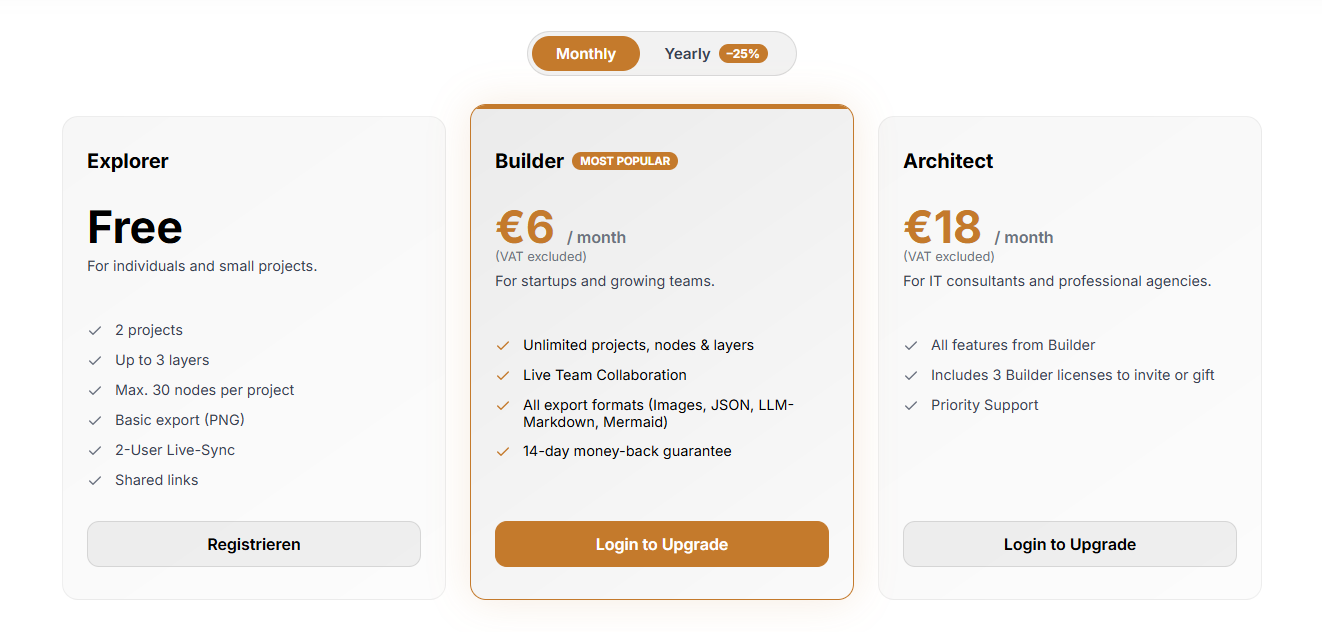
Lynara offers simple, transparent pricing for everyone from individual developers to enterprise teams:
Explorer (Free) — Perfect for Getting Started
The free plan is genuinely useful for learning and small projects:
- 2 projects: Manage multiple architecture designs.
- Up to 3 layers: Essential multi-layer support.
- Max. 30 nodes per project: Suitable for focused system components.
- Basic export (PNG): Export static images.
- 2-user live-sync: Collaborate with one team member.
- Shared links: Share your work easily.
This free architecture design tier is perfect for evaluating Lynara and creating your first projects without any financial commitment.
Builder (€6/month) — Most Popular
At just €6 per month (with a 25% annual discount available), the Builder plan unlocks professional-grade features:
- Unlimited projects, nodes, and layers: No restrictions on complexity.
- Live team collaboration: Work simultaneously with your entire team.
- All export formats: Images, JSON, LLM-markdown, Mermaid diagrams.
- 14-day money-back guarantee: Risk-free trial.
This plan is ideal for startups and growing development teams needing full access to Lynara's capabilities.
Architect (€18/month) — For Professional Consultants
The Architect plan builds on Builder with additional licensing:
- Everything in Builder: Full feature access.
- Includes 3 Builder licenses: Invite team members or gift to clients.
- Priority support: Faster response times.
This tier is designed for IT consultants and professional agencies managing multiple client projects.
Universities and Schools (Free)
Lynara also offers a free plan for students and educators:
- Free for academic use: Requires verification via a university/school email.
- All Builder features: Unlimited projects, nodes, layers, and full export formats.
- Covering 2000+ institutions: Available to students and educators worldwide.
This initiative supports the next generation of software architects.
Multi-Layer Architecture, Explained
For those new to multi-layer architecture design, Lynara's approach typically includes:
User Interface Layer
The topmost layer where users interact with your application: web interfaces, mobile apps, API gateways, and client-side components.
Services Layer
The business logic and processing layer: microservices, serverless functions, business logic components, and integration services.
Data Layer
Where information is stored and managed: databases (SQL/NoSQL), data warehouses, caching systems, and file storage.
Infrastructure Layer
The foundational layer supporting everything above: cloud services, container orchestration, networking, and security infrastructure.
This separation lets teams work on individual layers without affecting others, making system evolution far more manageable.
How Lynara Compares
Why Lynara Is the New Standard
According to Lynara's concept page, here's how they compare to the typical architecture documentation approach:
| Aspect | Status Quo | Lynara Platform |
|---|---|---|
| Tools and documentation | Chaos of tools and outdated wikis | Single Source of Truth |
| Data format | Images (PNGs) instead of structured data | Hybrid 2D/3D system modeling |
| Thinking approach | Horizontal thinking (just diagrams) | Vertical Logic (layer penetration) |
| Updates | Tedious, manual updates | Seamless real-time collaboration |
| AI compatibility | No AI-readability of the architecture | LLM-optimized JSON/API structure |
This architecture review confirms that Lynara represents a fundamental shift from static diagrams to dynamic, machine-readable architecture documentation.
What Makes Lynara Unique
- Authentic multi-layer framework: Built from the ground up for multi-layer thinking, not retrofitted to flat diagrams.
- Swiss precision: The attention to detail reflects Swiss engineering values.
- Modern tech stack: Browser-based with contemporary design principles.
- Developer-friendly: Keyboard shortcuts and efficient workflows.
- Future-proof design: Natively supports cloud-native, microservices, and distributed systems.
Real-World Applications
Based on this Lynara review, here are practical use cases:
Startup Product Development
- Design initial system architecture before coding.
- Communicate technical vision to investors.
- Plan for scale from day one.
- Document decisions for future reference.
Enterprise Digital Transformation
- Map legacy system modernization.
- Design cloud migration strategies.
- Standardize architecture across departments.
- Create compliance documentation.
Consulting Engagements
- Deliver architecture documentation to clients.
- Visualize existing system landscapes.
- Plan integration architectures.
- Guide technical decision-making.
Open Source Projects
- Document project architecture for contributors.
- Onboard new maintainers quickly.
- Visualize component relationships.
- Plan feature architecture.
Security, Privacy, and the Swiss Advantage
For enterprise users concerned about sensitive architecture data, Lynara delivers secure browser-based infrastructure and privacy-focused design. As a Switzerland-based platform, it adheres to European privacy standards and brings Swiss engineering precision. The platform features clear data handling policies combined with the Swiss reputation for dependable, innovative software.
Final Review Verdict
After thorough testing and analysis, this Lynara review concludes it's a compelling choice for teams seeking a modern software architecture visualization tool. The multi-layer architecture design approach is genuinely innovative, offering clarity that traditional diagram tools simply can't match.
Review Summary
- Architecture Design: ⭐⭐⭐⭐⭐ (5/5)
- User Experience: ⭐⭐⭐⭐½ (4.5/5)
- Feature Set: ⭐⭐⭐⭐⭐ (5/5)
- Collaboration: ⭐⭐⭐⭐⭐ (5/5)
- Value for Money: ⭐⭐⭐⭐⭐ (5/5)
- Overall Review Score: ⭐⭐⭐⭐⭐ (4.8/5)
Key Takeaways
Lynara excels at:
- Multi-layer architecture visualization.
- Complex system documentation.
- Team collaboration on architecture.
- Cloud-native and microservices design.
- Browser-based accessibility.
Consider alternatives if you need:
- Extremely simple diagrams.
- Desktop-only solutions.
- Deep UML compliance.
Final Thoughts
For software architects, development teams, and technical leaders seeking a modern system architecture design tool, Lynara delivers on its promise of precise multi-layer system design. The browser-based platform, combined with thoughtful features like keyboard shortcuts and import/export capabilities, makes it practical for real-world use.
The multi-layer approach isn't just marketing—it's a fundamental shift in how we think about and communicate software architecture. Whether you're designing microservices, planning cloud migrations, or documenting existing systems, Lynara provides the clarity and structure modern software development demands.
Experience the difference. Get started for free with no strings attached—no credit card, just architecture.
Ready to transform your architecture design workflow? 👉 Start Designing with Lynara today and see how precise multi-layer system design can revolutionize how your team approaches software architecture.
Tags
# Review# Lynara# software architecture visualization tool# system architecture design tool# architecture diagram tool# software architecture platform# Multi-layer architecture design# Cloud-native architecture# Microservices architecture# Architecture mapping# Interactive architecture canvas# System design visualization# Enterprise architecture# Architecture documentation# LLM-optimized export# Mermaid diagram export# Team collaborationNabbed Review - A Career CRM That Treats Job Hunting Like a Sales Pipeline
LicenseGen Review - A Developer-First License Key Manager for Software Products
Follow for new blogs
Subscribe to our blog
Subscribe to Newsletter
Subscribe to our newsletter to get the best products weekly.